 KanbanCord
Organising tasks with labels and priorities
As a task list grows, you want to see at a glance what kind of work each task is and what matters most. Labels and priorities do that, and both are managed with slash commands.
Switch them on
A server manager runs /kanbancord features and picks Labels, Priorities or both. Each board has its own labels and priority levels.
Priorities
Boards start with five levels, from most to least urgent: Critical, High, Medium, Low and Ignorable. Set a task's level with /task priority, or pick it in the form when you create the task.
/priority list board:Sprintshows the levels and how many tasks have each./priority create name:Urgent color:Red position:1adds a level; position 1 is the most urgent./priority movereorders them,/priority editrenames or recolours one, and/priority deleteremoves one (tasks that had it are left without a priority).
Labels
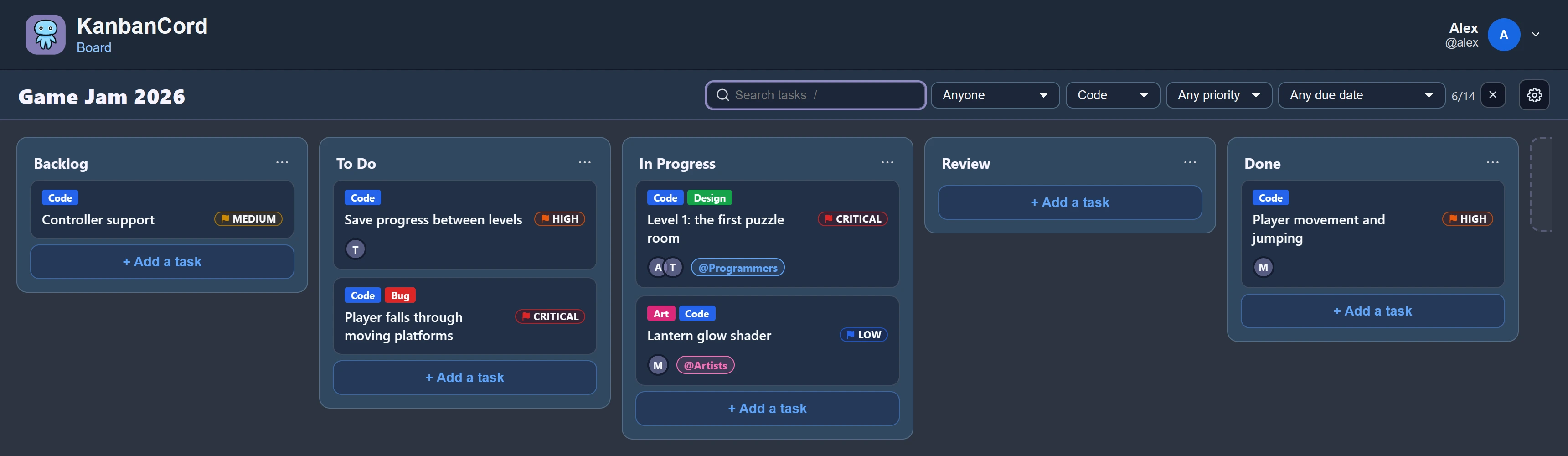
Labels say what a task is about: Bug, Design, Event, Docs. A task can have several.
/label create board:Sprint name:Bug color:Redmakes one. Pick a colour from the list or type any hex colour; leave it out and the board's least used colour is chosen./task label task:Fix login label:Bugputs it on a task, and the same command takes it off again./label list,/label editand/label deletemanage them.
Filter by them
On the website, a board's search bar filters tasks by label, by priority, by who is assigned and by due date, so “every high-priority bug” is two clicks away.
More guides
- Getting started: a kanban board in your Discord server · Add the bot, create your first board and your first tasks.
- A shared to-do list for your Discord server · A todo list everyone in the server can see, update and tick off.
- Assigning tasks and sharing work in Discord · Give tasks to people or roles, and keep them in the loop.
- Due dates and reminders in Discord · Deadlines, and reminders before they pass.
- Keeping your team up to date: board posts and update feeds · A live board in a channel, or a post for every change.
- Roles and permissions: who can see and change each board · Discord roles from the start, fine-tuned per board and per person.
- The website: every board at a glance · Drag and drop, search, filters and more, live with Discord.