 KanbanCord
Roles and permissions: who can see and change each board
Your server already says who is who with Discord roles. KanbanCord uses them, so the right people see and change the right boards from the moment you add the bot, and you can fine-tune it when you need to.
Out of the box
What someone may do follows the Discord permissions their roles give them, each step adding to the one before:
- View Channels: see boards and their tasks.
- Send Messages: also create and move tasks, comment, put labels on tasks, and assign themselves.
- Manage Messages (moderators): also edit and delete tasks, and assign other people.
- Manage Channels: also manage a board's columns, labels, priority levels, details and permissions, post boards in channels, and read the audit log.
- Manage Server and administrators: everything, including creating and deleting boards and the server's features and permissions.
Nothing needs setting up, and when someone gets or loses a role in Discord, KanbanCord follows straight away.
Fine-tuning
To change who may do what, a server manager switches on Custom permissions with /kanbancord features. Then, on the website:
- Server-wide rules say what each role may do on every board: create tasks, move them, assign others, delete, manage columns and more.
- Board rules change that for one board, for example to make a board only visible to a Staff role.
- Per-person rules make exceptions for one member, whatever their roles.
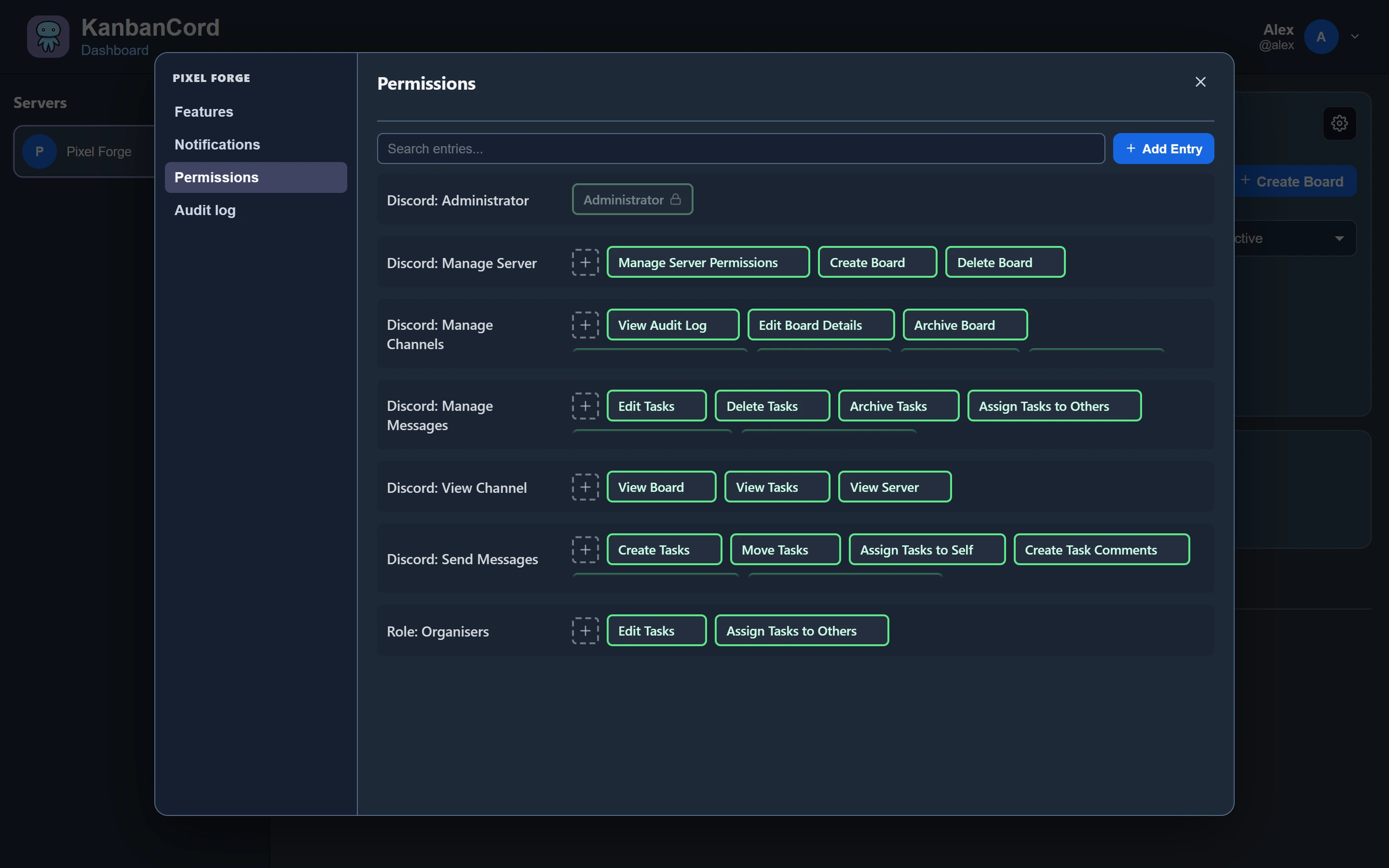
Rules can allow or deny. A rule for a person beats one for their roles, and a board's rules beat the server's. People who may change a board's permissions cannot give out more than they have themselves.
In Discord
The bot uses the same rules as the website: everything a command does is checked as the person who ran it. Menus only offer what you may do, and autocomplete only suggests the boards you can see.
One thing to keep in mind: a board post shows a board to everyone who can see its channel. Posting needs the right to edit the board, and you are asked first if some people there could not see it otherwise.
Keeping track
Every change, including changes to permissions, is recorded in the audit log on the website, with who made it and whether it came from Discord or the website.
More guides
- Getting started: a kanban board in your Discord server · Add the bot, create your first board and your first tasks.
- A shared to-do list for your Discord server · A todo list everyone in the server can see, update and tick off.
- Assigning tasks and sharing work in Discord · Give tasks to people or roles, and keep them in the loop.
- Due dates and reminders in Discord · Deadlines, and reminders before they pass.
- Organising tasks with labels and priorities · Coloured labels and priority levels to sort your tasks.
- Keeping your team up to date: board posts and update feeds · A live board in a channel, or a post for every change.
- The website: every board at a glance · Drag and drop, search, filters and more, live with Discord.